The whole sector, read for you
Every report Ofsted publishes is counted. You see how many homes fell below Good, and the requirements and recommendations inspectors gave them.
Children's Homes IQ reads every Ofsted children's home report so you do not have to. It turns them into a morning view of your homes, a way to learn from other homes and the inspectors who visit you, and a clear picture of the sector.
Every report Ofsted publishes is counted. You see how many homes fell below Good, and the requirements and recommendations inspectors gave them.
Find out how other homes in your area are managing, what the inspector who visits you looks for, and where experienced leaders have worked. We email you the day a new report is published.
Open the app each morning and the most urgent jobs across all your homes are at the top. Each one is a click away.
Eight parts, one record. Each part below shows the real screens, says what it does, and says which plan it comes with.
Open the app and see what needs you today, across every home you are responsible for.
Included on every plan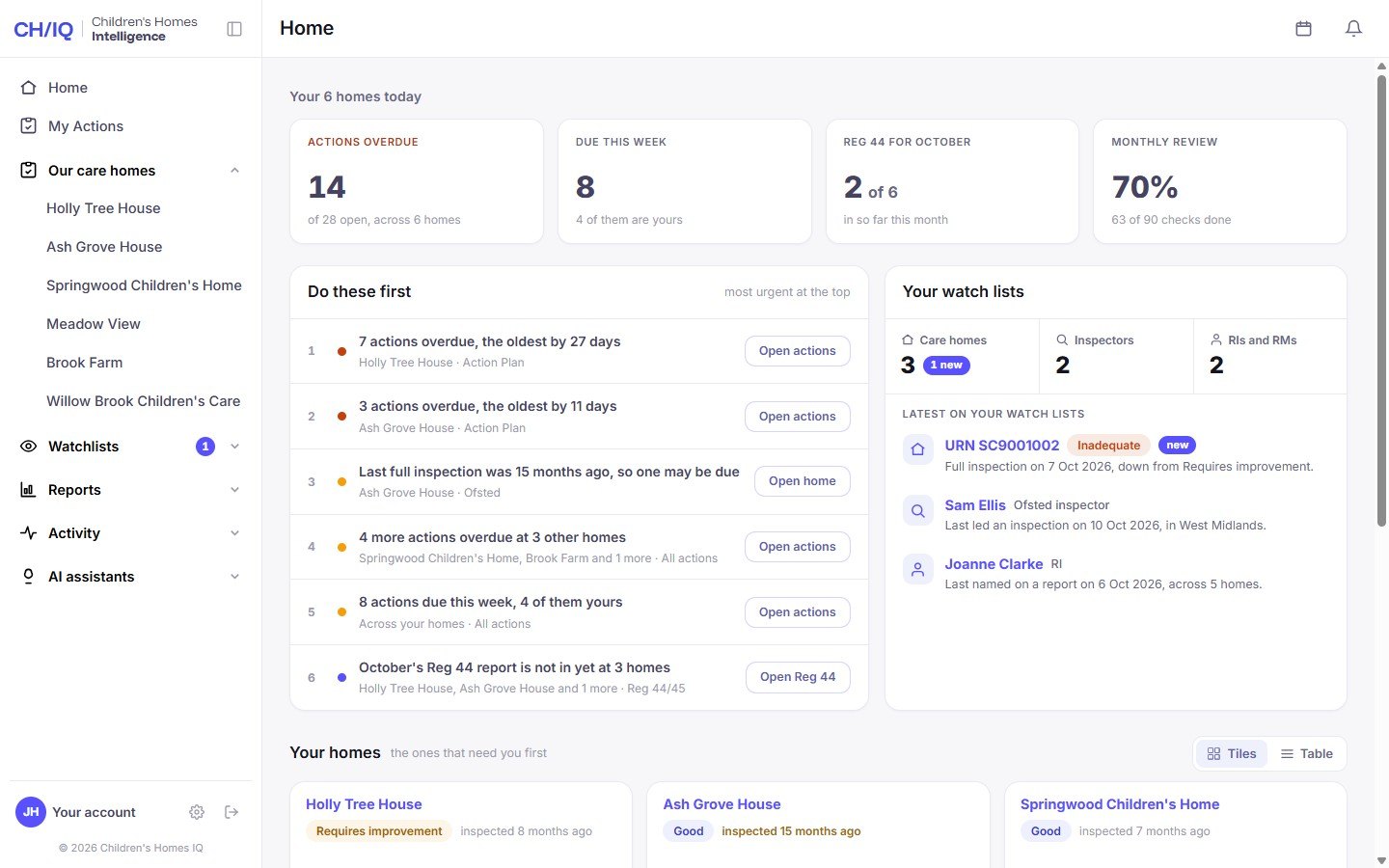
The home screen for a Responsible Individual with six homes, shown with example data. Press any screen on this page to see it full size.
The most urgent jobs across all your homes, in order. Each one has a button that takes you straight to it.
Actions overdue, actions due this week and how far the monthly checks have got. You know where you stand before you have read a word.
Your homes as tiles or as a table. The ones that need you sit first: below Good, actions overdue, or a long time since the last inspection.
The whole month's inspections in one report, with the sector picture and what it means for you. See what is inside.
Keep a list of the homes, inspectors and leaders you want to learn from. We tell you the day something new is published about any of them.
Included on every plan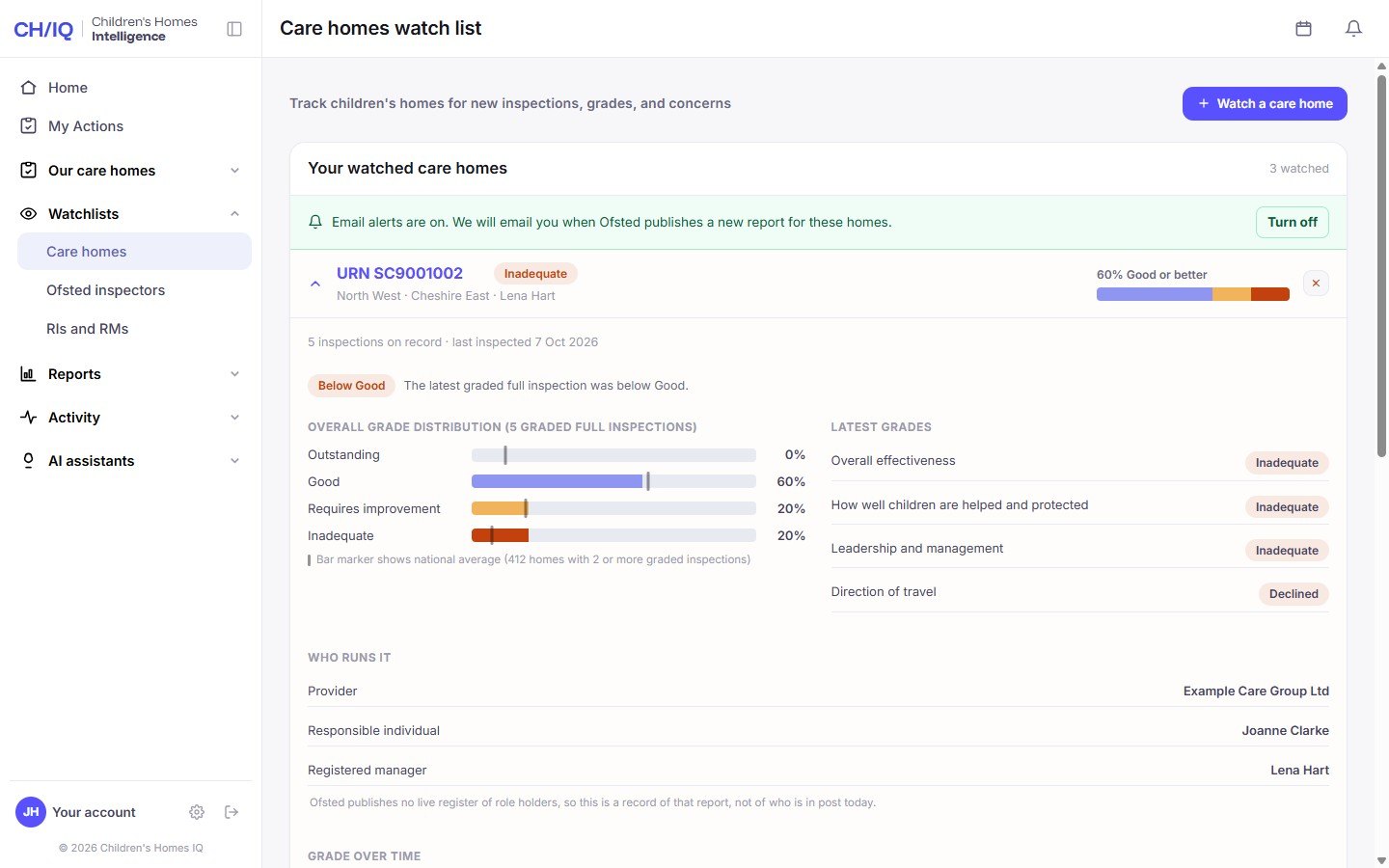
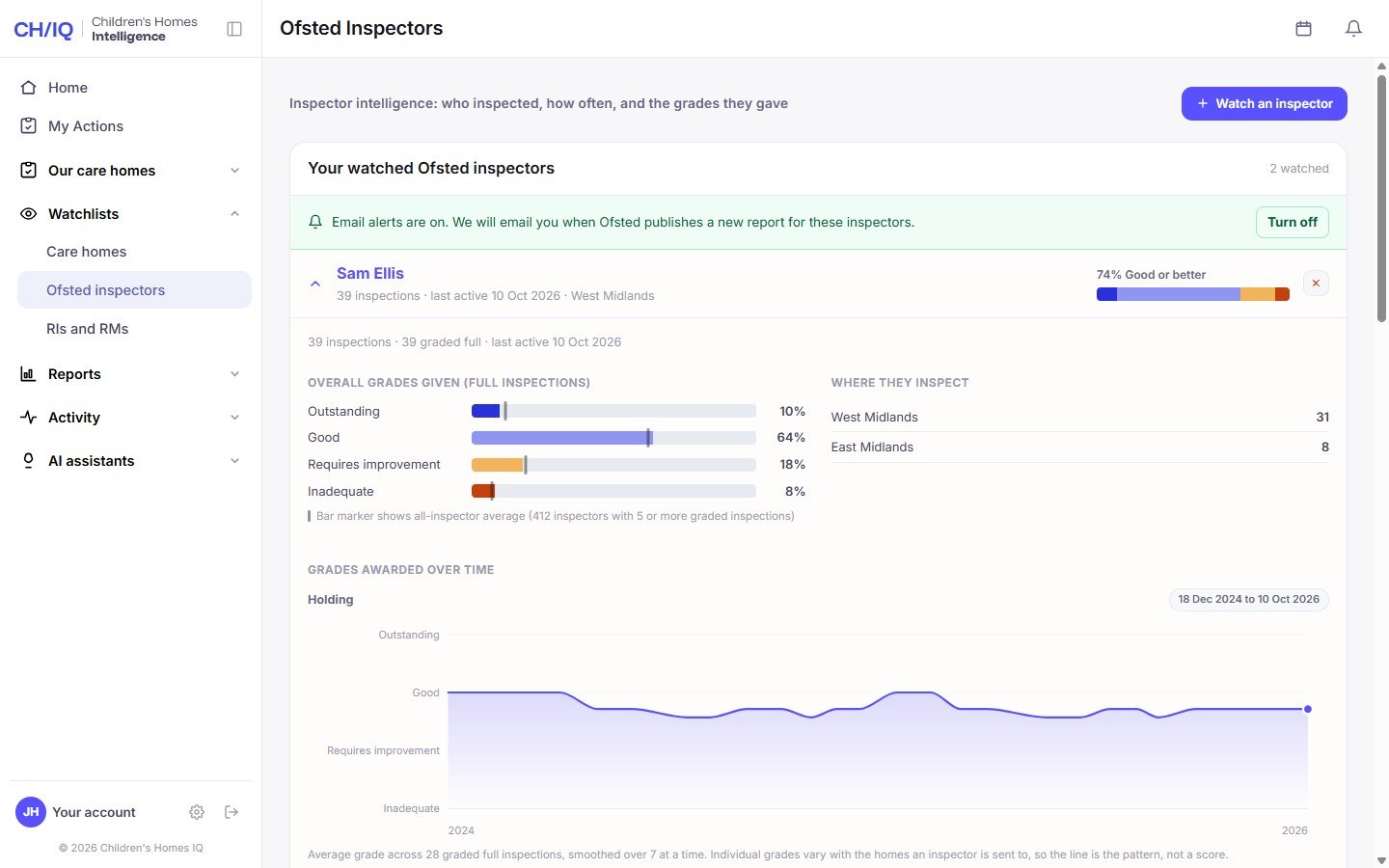
A watched home has just been rated Inadequate. Open it for every grade it has had, the national average beside each one, and who runs it.
Yours, one nearby, or one you are thinking of taking on. Find out how other homes in your area are managing: search by name or URN, then hear about every new grade.
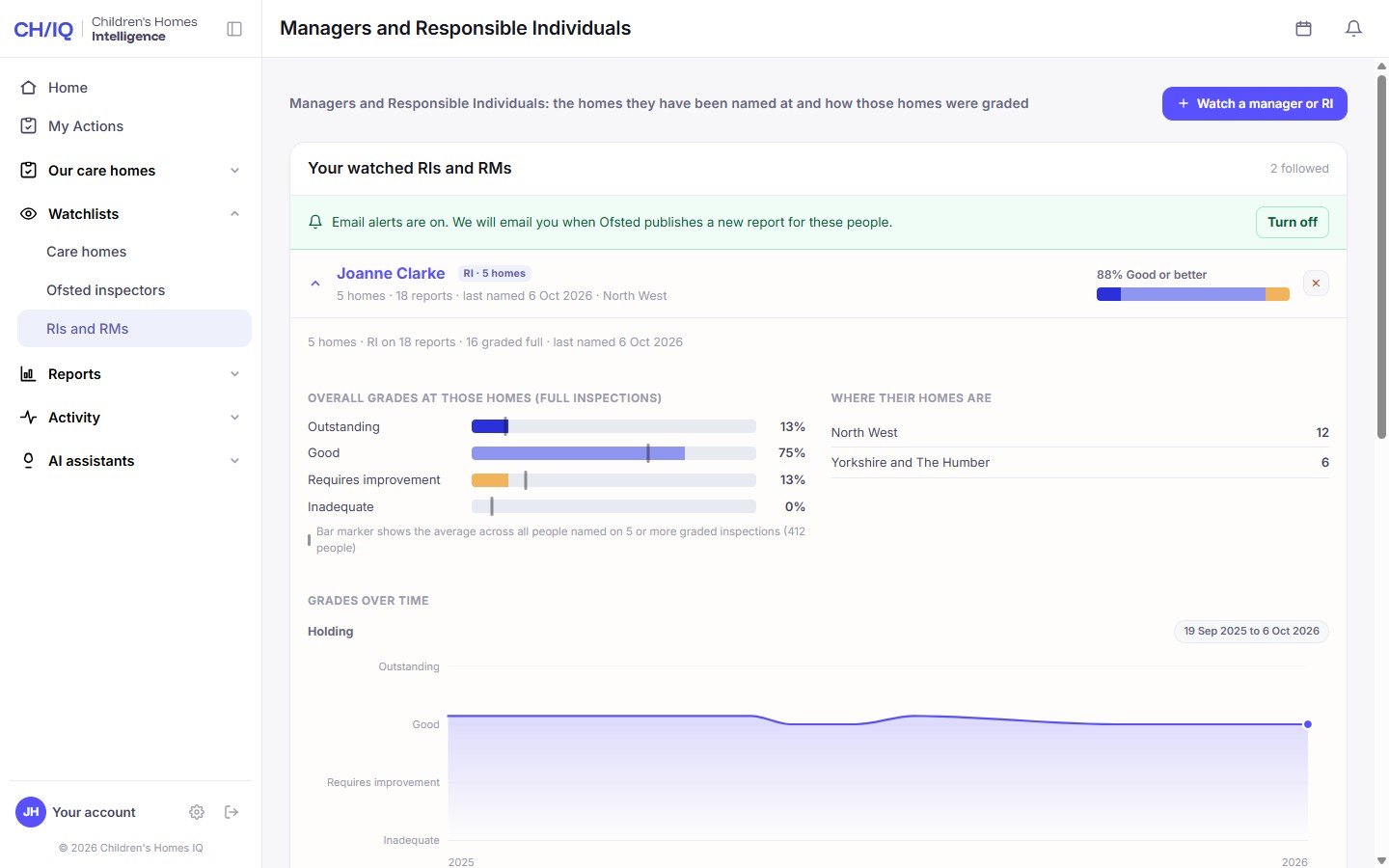
See the grades an inspector awards, how that compares with every other inspector, and the themes they return to. It is about knowing what to expect, never about gaming anyone.
See where Responsible Individuals and registered managers have worked and how those homes were graded, so you can learn from what strong leaders have done.
When Ofsted publishes a report on anything on your lists, you hear about it that day. You are never the last to know.
Your home screen shows the latest on your watch lists, and anything you have not seen yet is marked new.
Every grade a home has had, in order, with the direction of travel. Improving, holding or declining, at a glance.
What Ofsted is finding across the sector, month by month, counted from every published report and never estimated.
Included on every plan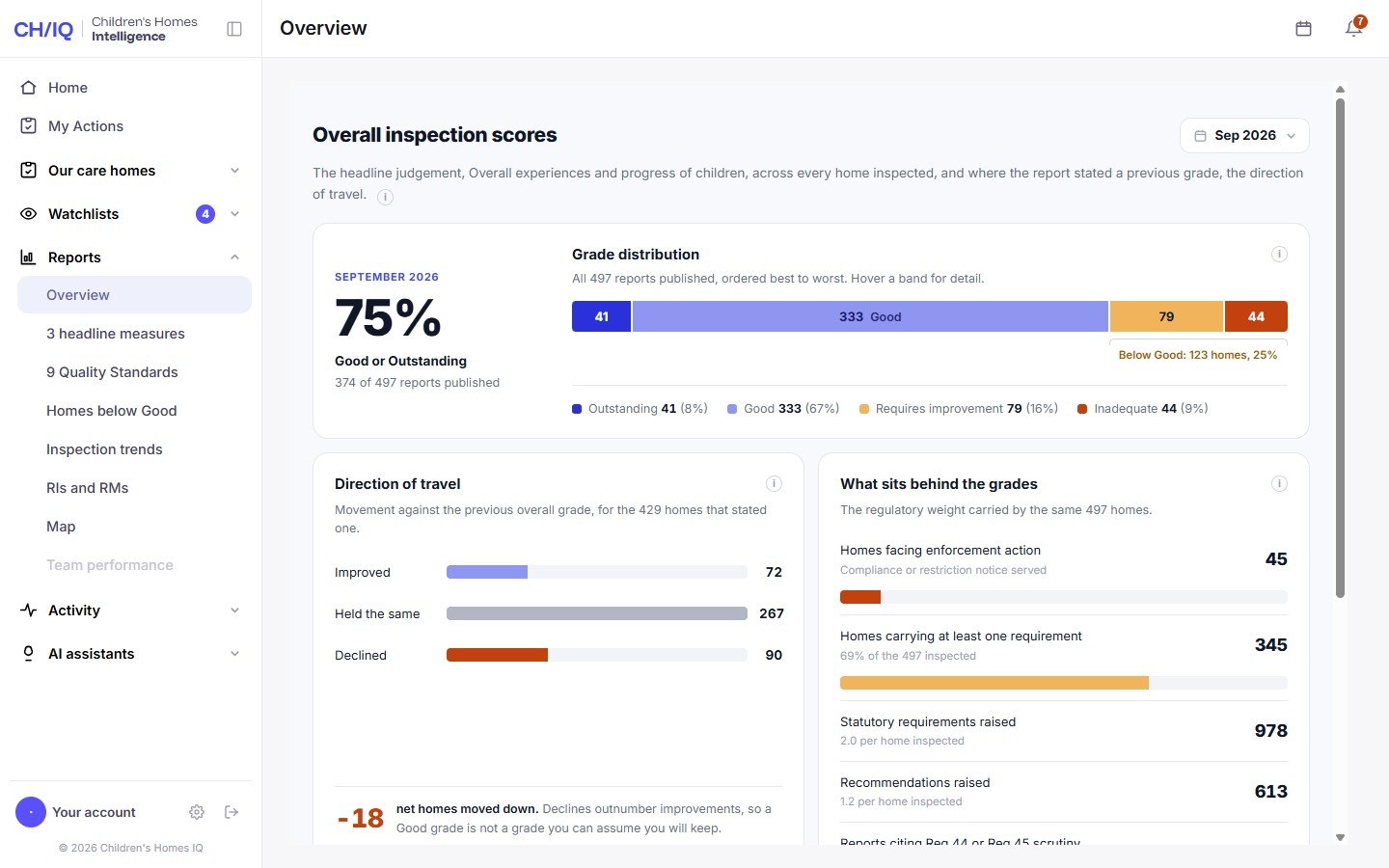
The overview for September 2026: 75% of the 497 reports were Good or Outstanding, and more homes moved down a grade than up.
Each month's grade mix, which homes improved and which declined, and the enforcement, requirements and recommendations behind the grades.
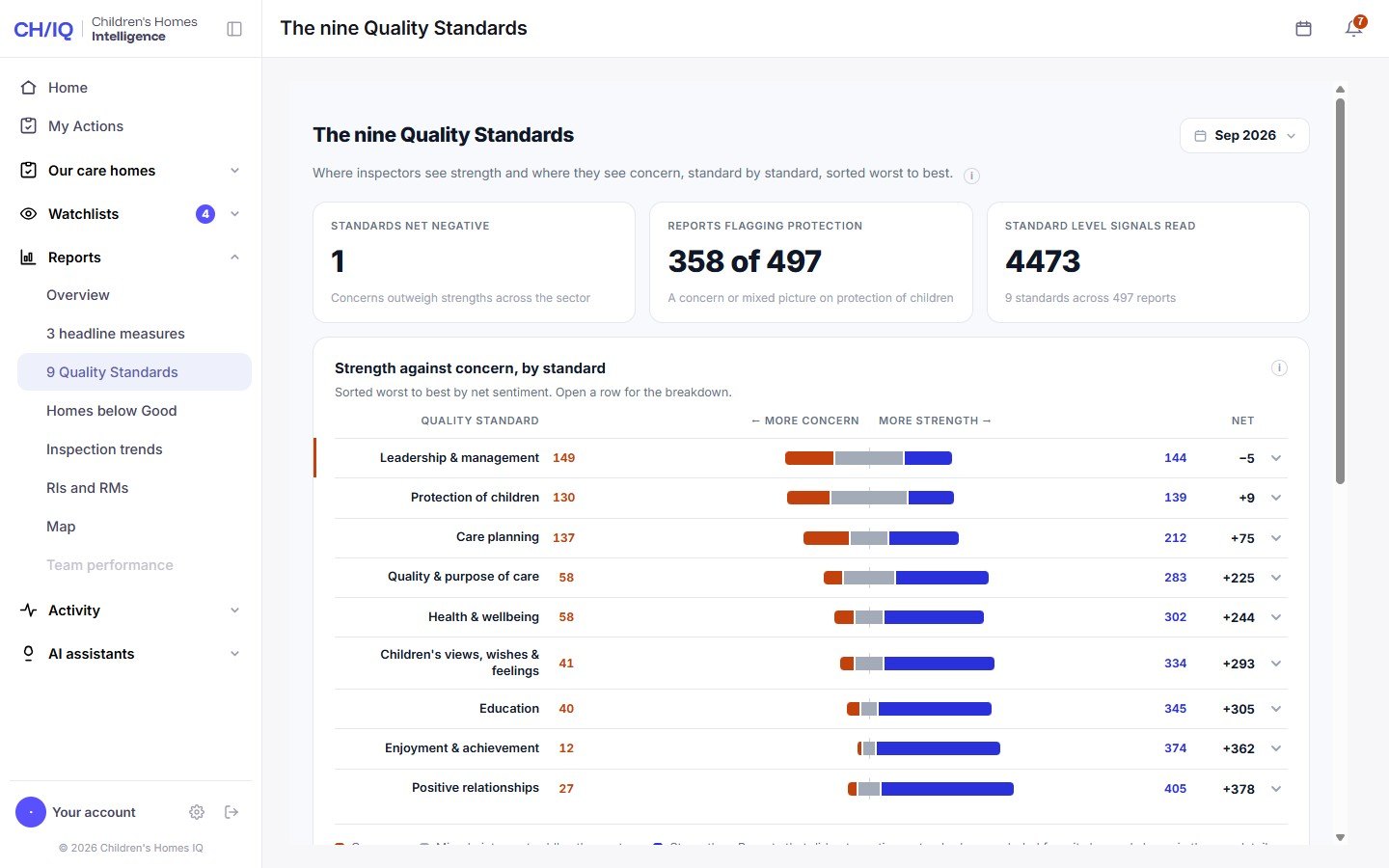
Where inspectors see strength and where they see concern, standard by standard. Open any row to read what lies behind it.
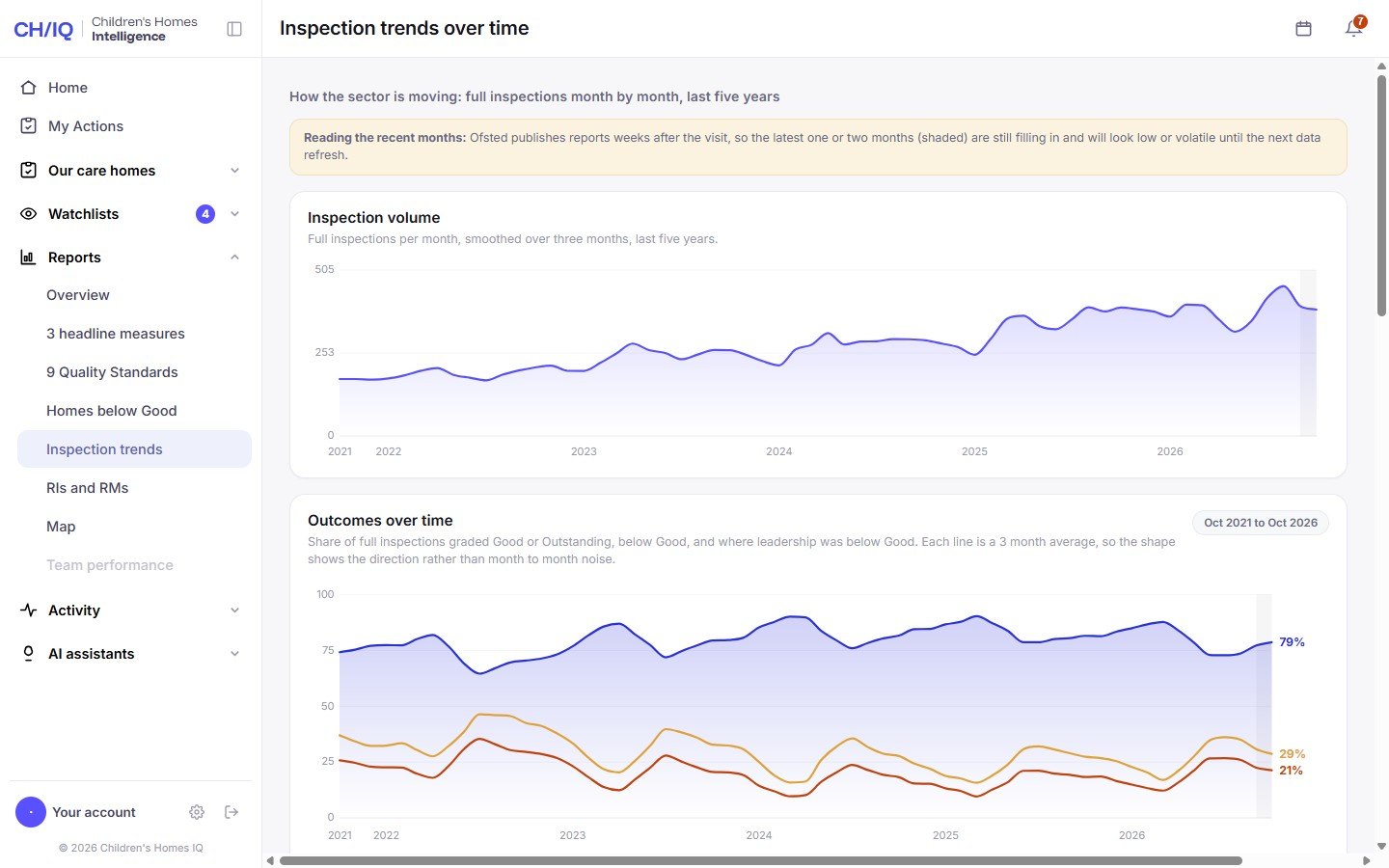
Five years of full inspections, month by month. See whether the sector is getting better or worse, and how leadership is faring.
Every home rated Requires improvement or Inadequate in the month, with what the inspector found and what they asked the home to do.
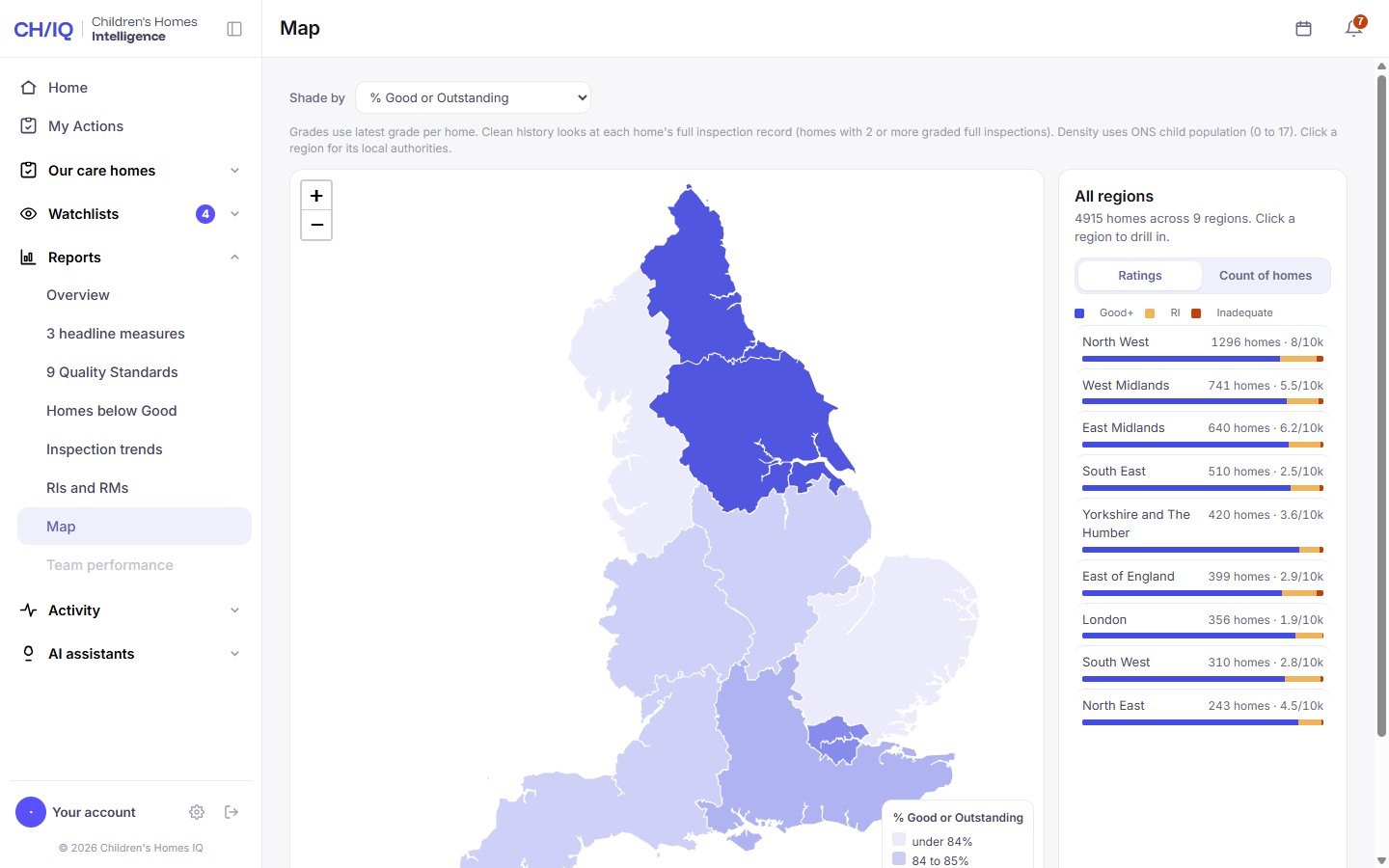
Grades across England's regions and local authorities, and how many homes there are for every 10,000 children who live there.
One small control picks the month. Every report opens on the last complete month, and you can go back as far as the record does.
At the start of each month, the whole of the last month's inspections in one report, with what it means for you.
Included on every paid plan More about the Briefing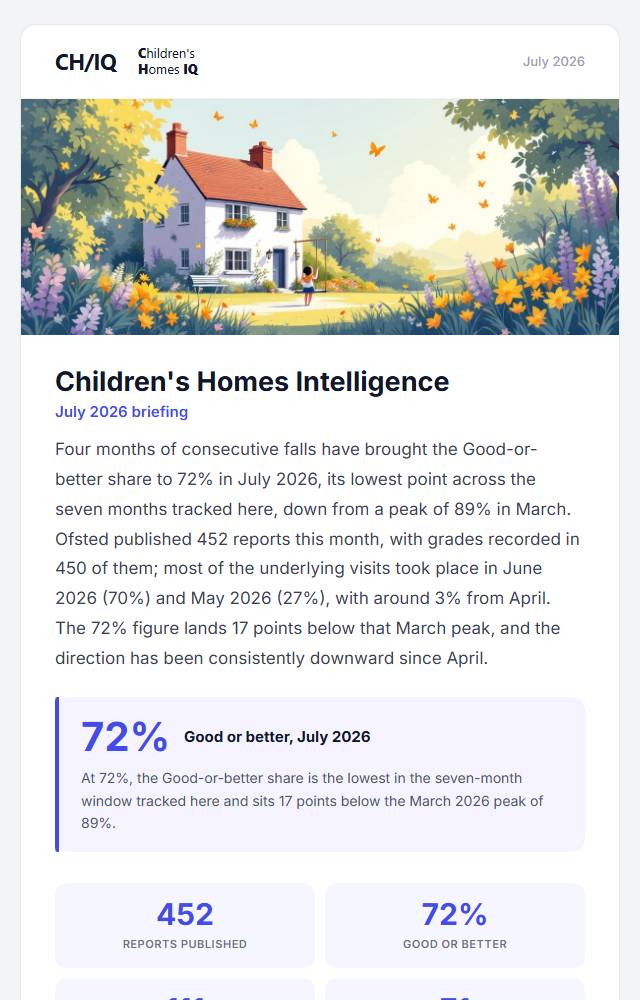
The opening of the July 2026 Monthly Briefing.
It opens on the share of homes rated Good or better, and how that compares with the months before.
How the grades moved in each region of England, so you can see how your area compares.
Who inspected the most homes that month, and the grades they gave.
The Quality Standards inspectors raised most often, so you can check your own homes against them first.
Ask a plain question and get an answer from your own policies, or from Ofsted's own guidance, with the source shown.
Included on Pro and Pro PlusAn example answer from the policy assistant.
Upload each home's policies and procedures. Each home's assistant answers from that home's papers only.
Every answer names the policy and the section it came from. It is for the moment something has happened and nobody can find the folder.
Ask about the social care common inspection framework, known as the SCCIF, and get the answer in plain English.
Answers come from the papers you uploaded for that home, not from a search of the web.
Upload each monthly visitor's report. We read it and keep track of what was raised.
Included on Pro and Pro Plus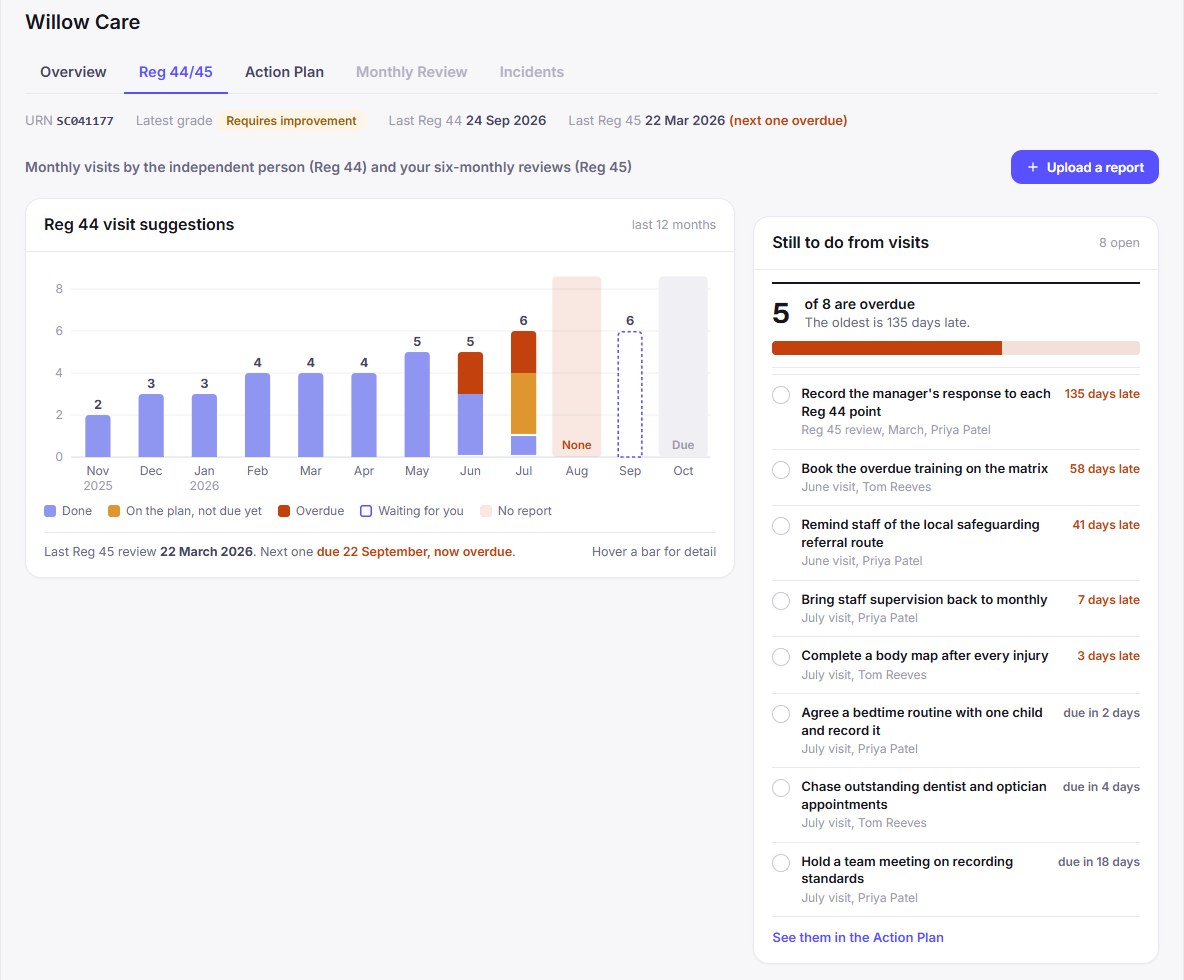
An example home. A bar for each monthly visit shows what became of each suggestion.
Drop in the visitor's report. We read the date, the visitor and every suggestion from it.
Accept the suggestions you agree with and they join the home's action plan, each with an owner and a due date.
Twelve months of visits, coloured by what happened, with any missing month marked.
We keep the date of each six-monthly review and tell you when the next one is due.
Every action across every home, with an owner, a due date and the Quality Standard it answers to. Nothing is carried into an inspection unclosed.
Included on Pro PlusNot started, in progress and done. Drag an action between groups, or tick it off when it is finished.
Pick the owner from the people who can see the home. They hear by a notice in the app and an email, and you hear when they finish.
Everything given to you, across every home, on one page. Start the day knowing exactly what is yours.
Each action carries a priority, the Quality Standard it answers to, and the dates it runs between. Anything overdue is marked in red.
Owners, Responsible Individuals and managers each get their own sign-in and their own view.
Compare the plansUp to 10 people on Essentials, 30 on Pro and 100 on Pro Plus. Nobody shares a password.
Invite a manager against the homes they run. An RI sees the group they oversee, and an owner sees everything.
One home on Essentials, up to three on Pro and up to ten on Pro Plus. More than ten? Talk to us and we will quote for your group.
Everything about the sector comes from Ofsted's published reports. Nothing is estimated, and nothing is taken from behind a login.
The Weekly Bulletin is free, and so is the readiness check. Neither needs an account or a card. Everything else on this page comes with a paid plan.
Essentials covers one home. Pro adds the AI assistants and Regulation 44 and 45 for up to three homes. Pro Plus adds action management for up to ten. See the plans.
Yes. The reports show real figures from Ofsted's published reports. The screens for your own homes use example homes and people, so no real home's records are shown.
Yes. Enquire and we will walk you through it with your own homes and the inspectors who visit them.
A short demo with a person, built around the homes you are responsible for. Or start with the free Weekly Bulletin and come back when you are ready.